
Name-Based Case Searches
The Terry County Clerk links an online records system for County Court civil and criminal indexes dating from 1981 to the present. Its official instructions say to choose Search, select an office, select a record type, and then use the criteria shown for that record type. The instructions do not publish a complete list of live name fields. That gap matters. Do not assume that a field accepts a last name, first name, or partial spelling until the selected search screen displays it.
For a district case, start instead with the Terry County District Clerk's official docket page. It publishes date and category based PDF dockets, not a general name-search form. Statewide searching is available through re:SearchTX, though the local clerk remains the best check for gaps.
- Identify whether the matter belongs to District Court, County Court, Justice Court, municipal court, or an appellate court.
- Choose the matching official portal or the District Clerk docket category.
- Use the exact name shown in a filing, then test reasonable spelling variants if the search permits them.
- Narrow a broad result by court, case type, or filing information only when those controls appear.
- Open the result and compare its cause number before relying on the match.
| Documented control | System | Required | Use |
|---|---|---|---|
| Office | County Clerk portal | Select first | Routes the search to the chosen office. |
| Record type | County Clerk portal | Select first | Includes Criminal and Civil examples. |
| Keyword | re:SearchTX | No | Starts a broad statewide search. |
| Search By | re:SearchTX Advanced | No | Supports party, attorney, judge, and case categories. |
Terry County Portal Paths
The County Clerk's online records guide separates a free index search from access to document images. A guest can review index information and preview a public image. Registration with a valid email is needed to buy an image. After choosing More Information or Images, a registered user can add a document to the cart, check out, download it, and later review purchases or receipts.
The county guide states that a purchase includes a 30-cent transaction fee. It does not say every record has an image or that every image is public. The Terry County Clerk page is the stable starting point when a vendor address changes.
The official County Clerk landing page shows where the online-records route begins. That source also connects the digital index to the office that maintains the County Court file.

A search result is only the first layer. Ask the clerk for the underlying filing or a certified copy when legal proof is needed.
Case Number Searches
A cause number is the strongest search key because it points to one court file. Terry's sample district dockets label this identifier as “Docket No.” or show a case row under the court heading. The research does not establish one universal Terry County pattern, so no made-up format should be used. Enter the number exactly as it appears, then retry with or without spaces or hyphens if the portal permits.
Keep the full value as a case code, such as the cause number printed on the notice. An appellate search can also accept the trial-court case number, county, and court. For a citation, use the citation or case number printed by the issuing court rather than treating it as a District Court cause number.
Terry County PDF Docket Search
The District Clerk posts court schedules, jury and non-jury dockets, tax dockets, juvenile dockets, dismissal dockets, and related notices as PDF files. These are snapshots organized by date or docket type. They are not a live, all-case database. Open the likely category, use the browser's Find command, and search the exact cause number. A name may work, but a number is less likely to produce a false match.
No match in a PDF: Check another date or docket type, then call the District Clerk because no result does not prove no case exists.
Case Search Results Explained
re:SearchTX can display case numbers and types, parties, attorneys, judicial officers, filings, documents, and hearings when those fields are available. Clicking a case description opens case details, while a hearing type opens hearing details. The local County Clerk workflow may offer index data, More Information, an image preview, and a paid image. The actual depth depends on the court and public-access rules.
| Case number | The court's identifying cause number; compare it with the source notice. |
|---|---|
| Case description | The entry that opens the case-detail view in re:SearchTX. |
| Filings | A chronology of filed items, which may not include a free document image. |
| Hearings | Setting information when supplied by the participating court. |
| Documents | Public files that may require purchase and remain separate from certification. |
A docket line summarizes activity. It does not prove what a signed order says. “Reset” does not assign blame, and “final hearing” does not itself prove that judgment was entered.
Terry County Statewide Search Tools
The official re:SearchTX portal offers Cases, Filings, Text in Documents, and Hearings searches. Advanced search, wildcard use, result sorting, export, saved searches, and alerts add depth. A free account supports account functions and document purchases through eFileTexas credentials. Purchased documents are generally listed at 10 cents per page with a one-dollar document minimum and stay available for download for up to 30 days, subject to current checkout terms.
The statewide search landing confirms the public entry point. It is useful for testing a Terry County result against a broader Texas index.
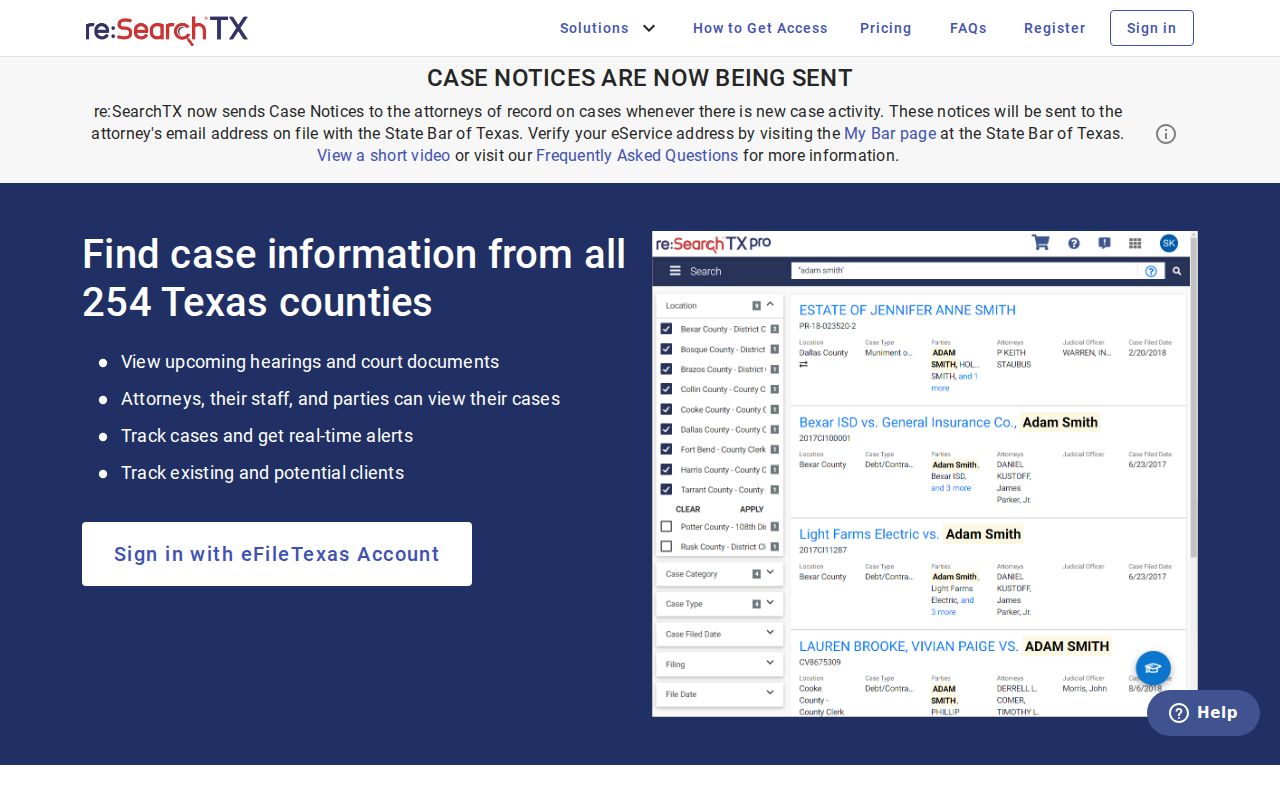
The 2024 state report describes a criminal-record coverage exception. Terry County felony searches therefore still need a District Clerk check.
Two Ways to Search: County and State
Local and statewide searches answer different questions. Use the Terry County Clerk portal for County Court index and image workflows. Use District Clerk PDFs and direct contact for the 121st District Court. Use re:SearchTX for a broader participating-court search. A Terry appeal belongs in the separate Texas appellate search, which refreshes nightly and can search by appellate or trial-court details.
| Search route | Best use | Main limit |
|---|---|---|
| Terry County Clerk portal | County Court civil or criminal index and public images | Not the full District Court file |
| District Clerk PDFs | Published district settings and docket categories | No universal keyword form |
| re:SearchTX | Cases, filings, documents, and hearings statewide | Coverage and document access vary |
| Texas appellate search | Seventh Court of Appeals matters | Not a live trial docket |
When Terry County Searches Fail
First confirm the spelling, court, year, and cause-number format. Then check whether the matter was transferred, appealed, or assigned a new number. Recent filings may not yet appear, and a static PDF may cover only one setting. Sealed civil records, juvenile files, nondisclosure matters, protected exhibits, and other restricted material may be absent or reduced to a case shell.
Call Tiffany O'Briant's District Clerk office at 806-637-4202 for a 121st District Court matter. County Court and probate questions go to Kim Carter's County Clerk office at 806-637-8551. Inspection and copy requests may also be made at the correct clerk's counter or by mail using the procedure that office confirms.
Which Cases Stay Restricted
Texas Family Code Chapter 58 limits access to juvenile records. Texas Rule of Civil Procedure 76a governs civil sealing, and other protections may cover victim information, protective-order details, medical records, financial data, or identifying exhibits. Expunction and nondisclosure can also change what appears publicly. A missing name is not permission to bypass a restriction.
Ask the custodian whether a public docket or redacted copy exists. For adjudicative case records, the court or clerk controls access. Texas Rule of Judicial Administration 12 applies to many non-adjudicative judicial records, while the Texas Public Information Act is not one blanket route for court case files.
Terry County Written Request Route
The county's Public Records Information page links request and Social Security number redaction paths. It is most useful for routing non-adjudicative county records. A pleading, order, or docket should be requested from the clerk that keeps the case. Written requests should name the court, cause number, document, and preferred copy type.
The official request page shows that request and redaction procedures are separate. It also gives a reliable county source when a case search ends without the needed document.
Do not send sensitive identifiers by ordinary email. Ask the clerk which secure or written method applies.